
Cluster Operation Modes
There can be different modes of operation in a HyperServer server farm. Each mode has its own pros and cons. There are three different modes which you can configure your slave nodes.
Pass Through (hcmPassThrough)
Mode 0 or Pass Through mode is the default mode of operation. In this mode all requests pass through the master HyperServer instances. Master HyperServer will be the only entry point to your entire server farm. All requests will be accepted by the master HyperServer and distributed internally to the respected Slave Nodes. This includes all incoming requests, including HTTP requests, Ajax requests and file requests. Master HyperServer communicates with its own Nodes (if there are any) and the ServerNodes. Each ServerNode also communicates with its own Nodes.
The guidelines in the Setting up a HyperServer Server Farm creates a Pass Through HyperServer server farm.
Pros:
You only need to have one public URL which is the entry point to your server farm. This public URL redirects all the requests to your master HyperServer. You don't need to expose ServerNodes to the public internet.
Setting up a Pass Through mode server farm is easier and faster.
Easier to maintain
uniGUI runtime files can only be installed on the master HyperServer.
Cons:
Performance may degrade when there are lots of concurrent incoming requests and there are many Nodes in the server farm.
Direct (hcmDirect)
In this mode, master HyperServer directly communicates with the Nodes belonging to the slave ServerNodes. So each ServerNode will create its own Nodes, but it is the master HyperServer which will directly communicate with them. All incoming traffic is redirected to all Nodes in the server farm through the master HyperServer. In this mode, the main job of slave ServerNodes is to create and maintain local Nodes and pass them to the master HyperServer.
(This mode is not implemented yet)
Url Redirect (hcmUrlRedirect)
In this mode ServerNodes which are configured as cluster_mode=2 will serve all of the repected requests directly — i.e. requests won't go through the master server.
When a new session request is received by master HyperServer it will decide which ServerNode should serve this request. If the ServerNode is configured as Mode 2 then the incoming URL will be redirected to that ServerNode.
Example:
Consider your cluster consists of three servers. One master HyperServer located at the URL http://myserver.com and two ServerNodes with public URLs http://server1.myserver.com and http://server2.myserver.com.
When a new session request is received by the master HyperServer, based on load balancing mechanism one of the ServerNodes is selected and a URL redirection request is sent back to the browser. Browser will redirect the URL to the new server which is one of the ServerNodes in above example. So the new session will start at either http://server1.myserver.com or http://server2.myserver.com.
Initial request ---> http://myserver.com ---> Load Balancer
---> http://server1.myserver.com
---> http://server2.myserver.com
---> http://serverx.myserver.com
This redirection mechanism will relieve master server from processing the subsequent requests for sessions as it would happen in Mode-0.
How redirection works?
When a master HyperServer receives a new request from a client, it will try to find a ServerNode based on an internal load balancing algorithm. If the ServerNode is configured as Mode-2 then instead of sending the request directly, a new URL is created and the client is redirected to this new URL. This new URL is the public URL of the ServerNode.
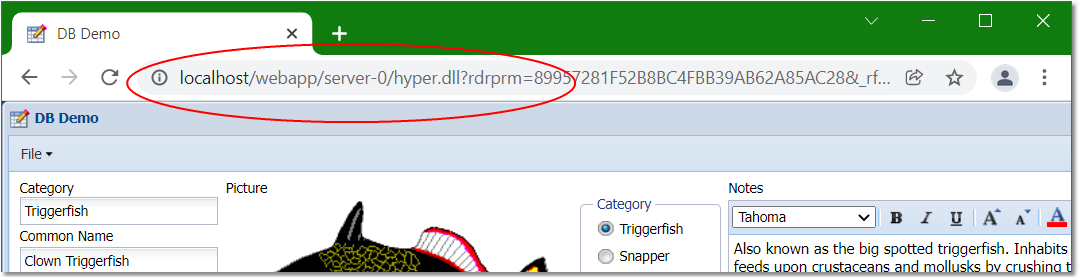
Consider the entry point to your master is: http://localhost/webapp/hyper.dll
and you have a slave configured as Mode-2 with the public URL of: http://localhost/webapp/server-0/hyper.dll

After pressing enter the page is redirected to a new URL which is the public URL of your ServerNode. You can also observe that some additional parameters are added to the URL. We will explain meaning of these parameters later.
Should I prefer Mode-2 over Mode-0?
The answer is yes if you have a large cluster with many ServerNodes and performance is your primary concern. You can decide better by analyzing pros and cons of this mode below:
Pros:
Better scalability compared to Mode-0. Incoming traffic is redirected to the related ServerNodes, so there will be no performance degrade when there is a high burst of incoming requests.
Cons:
Each ServerNode should be opened to the internet with a public URL.
uniGUI runtime files should be installed and updated on each ServerNode.
Additional steps are needed to complete the configuration.
Note: Mode-2 is introduced in uniGUI 1.90.0 build 1557.