
Setting up a HyperServer Server Farm
Configuring and setting up a server farm is straightforward. For example, to build a farm with three servers you run three HyperServer instances: one acting as the master and two as slaves (ServerNodes). The master HyperServer handles incoming requests and relays them to its local Nodes and the ServerNodes in the cluster.
Configuring Master HyperServer
To convert a regular HyperServer into a master, add one or more ServerNodes to the master HyperServer CFG file.
Example: adding two ServerNodes to the master CFG file
[server-0]
enabled=1
url=http://192.168.1.32:8077
name=HP-ML150
token=gmvsek210828175924563

[server-1]
enabled=1
url=http://192.168.1.33:8077
name=DELL-7080
token=eftrgj210828180420097
Details:
[server-0]Each ServerNode configuration begins with a section named server- plus a unique number (e.g., server-0).
Determines if the ServerNode is enabled. When enabled, traffic is redirected to this ServerNode; otherwise it is ignored.
The HTTP address used to communicate with this ServerNode.
Examples:
http://192.168.1.33:8077 — URL with physical IP address
http://webserver-1:8077 — URL with network name of a local server
http://mycompanydomain.com:8077 — Global URL with a domain name
Optional name to help identify the ServerNode.
A token is a unique identifier required to authorize the master HyperServer to remotely access the Server Control Panel of the ServerNode. The token is automatically generated in the ServerNode's CFG file the first time you run the ServerNode executable; copy it into the master CFG.
You must restart HyperServer after adding or modifying these parameters. (Future releases will allow changing server farm parameters from the Control Panel without restarting.)
Additional parameters related to Cluster Operation Modes
For default cluster mode (0 - PassThrough) you don't need to change these. See Cluster Operation Modes for more details.
(Links retained as in original:) https://unigui.com/doc/online_help/cluster-operation-modes.htm
Configuring Slave HyperServer Instances (ServerNodes)
Configuring a slave HyperServer is similar to a standard HyperServer instance. Configure required HyperServer parameters, test the instance locally, and deploy in Service mode for production (Standalone mode is for testing/debugging). For the master you may use any deployment method (ISAPI, Apache module, Windows/Linux Service, or Standalone EXE for testing).
When running a ServerNode, a token parameter is automatically created in its CFG file. Example snippet:
Copy this token string into the ServerNode configuration section of the master CFG file:
Testing Your Server Farm
Run the slave HyperServer instance first, then the master. Example test: one slave and the master on the same PC using different ports. Master runs on port 8077 and slave on port 8078.
Open the master Server Control Panel:
http://127.0.0.1:8077/server
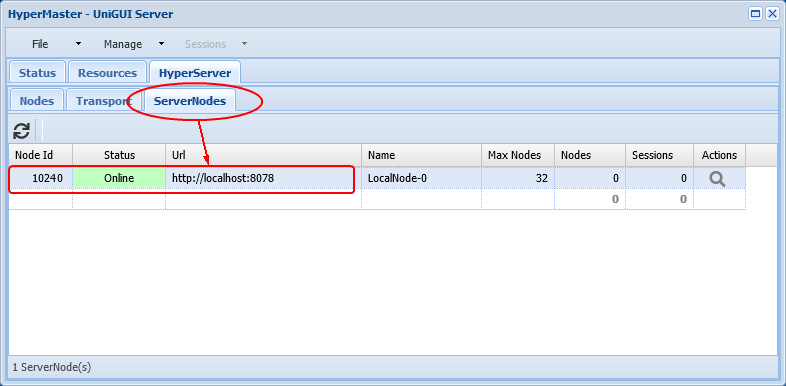
In the Server Control Panel open the ServerNodes page. You should see the configured ServerNodes. If communication is working, the ServerNode at http://127.0.0.1:8078 should be shown as Online.
You can access the Control Panel of the slave from the master's Control Panel by clicking the search icon in the Actions column.

Clicking the icon opens a page titled with the ServerNode name configured:
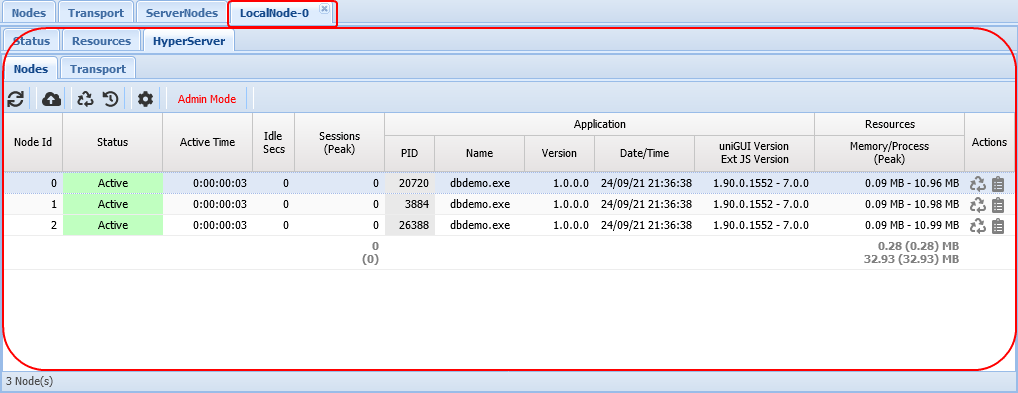
From this page you can monitor and manage the ServerNode (Nodes, sessions, configuration) from the master Control Panel.
Running Web Application Sessions in a Server Farm
Open the master HyperServer root URL and the web application will display in the browser.
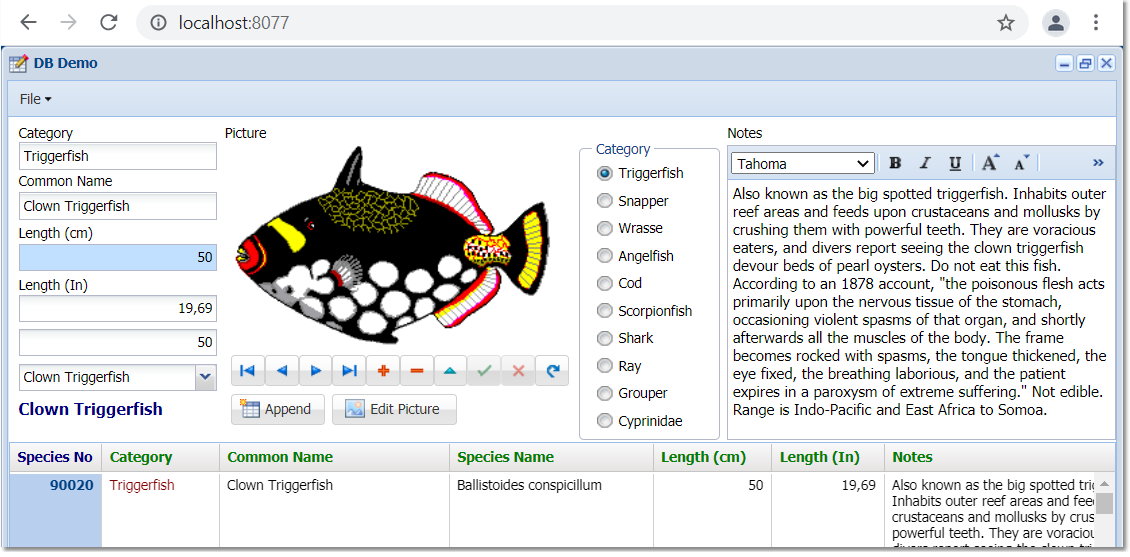
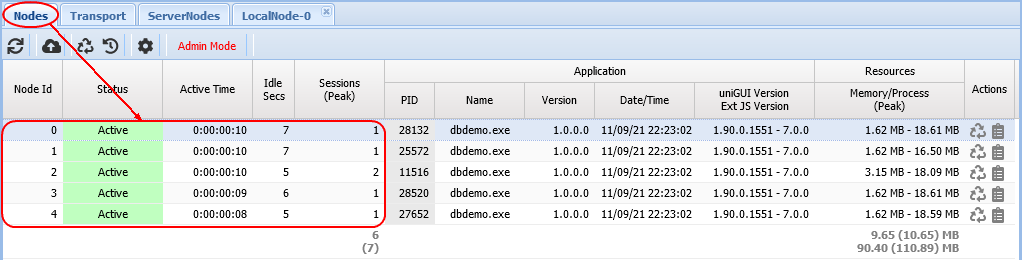
On the ServerNode you will see a Node created (e.g., LocalNode-0).
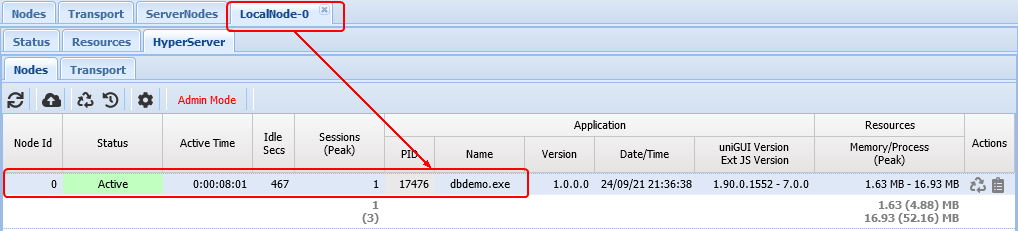
On the ServerNodes page you will see Node and session info. ServerNodes receive IDs starting from 1024 (e.g., ServerNode with Node Id 1024 has one active Node and one running session).

Master HyperServer can serve two roles:
Load balancer for ServerNodes (redirects traffic), and optionally
A regular HyperServer owning local Nodes and web sessions.
To make the master act only as a load balancer (no local Nodes), set in the master CFG:
This prevents the master from creating local Nodes; all incoming traffic will be redirected to ServerNodes.
Persistent Node in a Server Cluster
To ensure certain tasks run in a specific Node, set persistent_node=1 in that ServerNode's CFG file.
In your application code ensure the task runs only on the Persistent Node:
You can also configure the master HyperServer to be the Persistent Node by setting in the master CFG:
HyperServer Applications can own Persistent Nodes by setting persistent_node=1 in the application configuration:
See Terminology for more information: https://unigui.com/doc/online_help/terminology.htm
Below section only applies to HyperServer versions prior to 1.95 and is provided here for reference only. For version 1.95 and later use the new "Persistent Node" feature.
Persistent Node Zero in a Server Cluster
To run tasks in Node Zero of a selected ServerNode, set persistent_node_zero=1 in that ServerNode's CFG file.
Example code to ensure only Node Zero of the selected ServerNode runs the code:
To run code in Node Zero of the master HyperServer replace 1024 with -1 and set persistent_node_zero=1.
Starting from uniGUI build 1566 a new property simplifies this: ClusterNodeZero. The prior handlers can be replaced with:
ClusterNodeZero returns True if Node Id is zero and, when running in a server farm cluster, the ServerNode is also 1024. If the running application is not a Node and not part of a cluster, ClusterNodeZero returns True.
Implementation (from uniGUIServer.pas):
This ensures your thread task runs on only one Node regardless of total Nodes in the cluster.
While the above works, it's better to enable a Timer only when the Node is Node Zero. Because ServerNodeId may be populated after Node creation, enabling a timer in OnCreate may be unreliable. uniGUI provides the OnClusterNodeIdChange event which fires initially when the Server Module is created and whenever ServerNodeId changes.
Recommended pattern (build 1566 and later):
References (kept as in original):
https://unigui.com/doc/online_help/index.html?setting-up-a-hyperserver-serve.htm
https://unigui.com/doc/online_help/hyperserver.htm
https://unigui.com/doc/online_help/hyperserver-server-farm.htm
https://unigui.com/doc/online_help/distributing-traffic-in-a-hype.htm
https://unigui.com/doc/online_help/cluster-operation-modes.htm
https://unigui.com/doc/online_help/hyperserver-applications.htm
https://unigui.com/doc/online_help/terminology.htm