Delphi 11 and High DPI mode
Delphi 11 Alexandria introduces a new mode which supports high DPI IDE designer. This will improve designing experience when you use a 2K or 4K monitor. Here is a blog article about this new mode.
Using this mode has some drawbacks. When you use a DPI higher than 96 DPI, IDE will try to resize screen elements based on new DPI. DFM file will save the new DPI and modified dimensions of the form and its child controls. When running the application Delphi will try to match the Form's DPI with current screen DPI and resize screen elements if needed. This works perfectly for VCL desktop applications, but for uniGUI apps it has no affect, as the screen DPI is controlled by the browser.
Question here is that how uniGUI apps will behave if the uniGUI forms are deigned in a DPI different than 96?
Consider your form contains a single TUniButton with default dimensions (75 x 25 pixels). When designer is set to 96 DPI these dimensions are preserved, but in higher DPIs IDE will resize the element based on the DPI value. So if your IDE is set to 150 DPI, button will be resized to (117 x 39 pixels) and these values are saved in the DFM files along with new DPI (Saved as PixelsPerInch).
When you run the web application, uniGUI will try to resize screen elements based on 96 DPI, so browser will render elements as if uniGUI forms are designed as 96 DPI.
uniGUI build 1555 and later support above feature. However, we should keep in mind that this is still not a perfect world. For new projects you may not experience any issues, but when you open an old projects designed in 96 DPI in new Delphi 11 IDE with a High DPI it may cause some problems. Especially if your uniGUI application is a mixture of forms and frames.
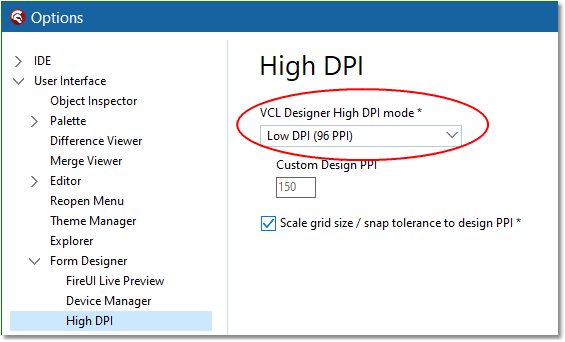
Our recommendation is to stick to 96 DPI mode when you work with uniGUI projects. High DPI will not have any affect on runtime experience and will improve your design time experience only. The main problem is that with DPIs different than 96, Delphi IDE will try to change component dimensions and font size. These new values are saved to the DFM file and this automatic modification can produce side effects that are hard to predict. In theory, uniGUI can resize screen elements back to their original sizes at runtime, but there can be scenarios where this may not work as expected.