
Client-side Scripting
One of the advanced features of uniGUI is the ability to write JavaScript handlers for client-side events — i.e., to add JS code for Ext JS events for uniGUI controls. Ext JS is a complete JavaScript framework with a rich set of components. Ext JS has its own object hierarchy; like Delphi objects, each Ext JS component derives from a parent object.
A few notes:
JavaScript supports patterns that allow object hierarchies and inheritance-like behavior, but member visibility differs from Object Pascal: so-called private properties and methods may still be visible in child classes and accessible from object instances.
Requirements for client-side scripting in uniGUI:
A fair knowledge of JavaScript (syntax similar to C/Java).
Familiarity with the Sencha Ext JS library API.
You can still write client-side code with minimal JS/Ext JS knowledge for simple tasks.
Below is a simple example workflow showing how to add a client-side event handler to a TUniButton.
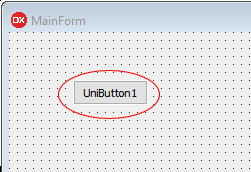
Open ExtEvents in the Object Inspector
In the Object Inspector, select the ClientEvents property, then double-click the ExtEvents sub-property to open the uniGUI JavaScript event editor.
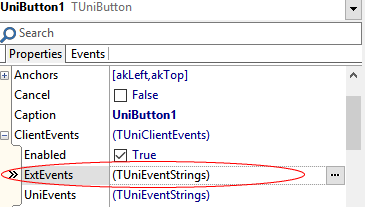
The uniGUI JavaScript event editor lists available Ext JS events for the control.
Choose an Ext JS event and add your handler
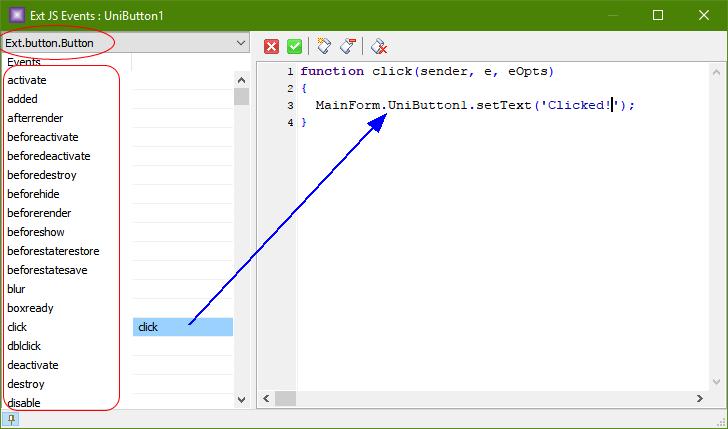
In the event editor, on the left side you will see all available Ext JS events associated with TUniButton. The top-left corner will display Ext.button.Button — the Ext JS component used by TUniButton. Double-click an event (for example, click) to open an event handler and start typing your custom JavaScript code.
Access the uniGUI control from client-side code
To access a uniGUI object on the client, use the owner name and object name in the form .. Names must match the Delphi-declared identifiers exactly (case-sensitive). For example, a button named UniButton1 owned by MainForm is accessed as:MainForm.UniButton1Once you have the client-side reference, you can call any Ext JS methods available for the corresponding Ext component. Although UniButton1 is a server-side TUniButton instance, MainForm.UniButton1 is an instance of the client-side Ext.button.Button component.Example: change the button caption at runtimeThe Ext.button.Button class exposes methods such as setText() to change the button caption at runtime. Use the method from your client-side handler. For example, calling:MainForm.UniButton1.setText('New Caption');will update the button text. Note that JavaScript is case-sensitive and control names must match exactly how they were declared in Delphi.Run the application and testRun the application and click the button to see the client-side handler in action.