
Important Notes Regarding HyperServer
There are differences between the classical uniGUI application model and HyperServer. The biggest difference is that HyperServer is a multi-process model compared to the single-process model of a conventional uniGUI application. With HyperServer multiple Nodes, which are actually instances of your application, will run concurrently.
Cache Folders & Log files
Each Node will create its own private global and private cache folders. Each Node will also create a private log file which will be visible to that Node.
Sessions
Another important difference from the classical model is that in the classical model your application is able to access all available session objects, while in HyperServer each Node can only access sessions which are created by that specific Node. Each Node holds a set of sessions which are isolated from other Nodes.
If you need to query all of the sessions, use an external method such as saving session information in a database table. For example, create a row in a table when a session is created and remove it when the session is freed.
Other Special Folders
Nodes have their own private cache folders but use common paths for FilesFolder and TempFolder. Since these folders are used as read-only it should not pose a problem for uniGUI Nodes. In general, you should only create files and folders in Cache folders and use FilesFolder and TempFolder as read-only folders.
Anti-virus and Other Protection Software
Some protection software (such as anti-virus products) can intercept HTTP communication and try to filter it. This may interfere with the HTTP transport channel used to communicate between Nodes and HyperServer. There have been reports that ESET anti-virus can filter HyperServer communication and prevent proper operation.
It is important to ensure no such software is interfering with the internal HTTP channels used by HyperServer. It is not recommended to install that type of protection software on a production server. If you require protection software, prefer solutions specifically designed to work on server operating systems.
Firewalls
Because uniGUI HyperServer internally relies on HTTP communication, make sure that neither Nodes nor HyperServer are blocked by the firewall.
Node Version and HyperServer Version
Starting with version 1.50.0.1480 of uniGUI and HyperServer, it is possible to mix Nodes compiled with different versions of uniGUI, provided that all of them are compiled with a uniGUI version greater than 1.50.0.1480. You can recognize the HyperServer version by opening the Server Monitor.

You can also recognize Node version information from the HyperServer control panel.
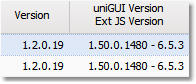
In the above example Node's application version is 1.2.0.19, it is compiled with uniGUI version 1.50.0.1480 and used Ext JS version is 6.5.3. (Node's application version is irrelevant to this topic.)
You will be able to use Nodes compiled with uniGUI version 1.50.0.1480 or greater with HyperServer version 1.50.0.1480 or later. This rule remains valid until there is a breaking change in the transport protocol, new transport channels, or other major changes in HyperServer that make it incompatible with previous Node versions. When such a breaking change occurs, it will be announced in the uniGUI changelog or release notes.
Important when mixing Node uniGUI versions
If you are using custom paths for ExtRoot and UniRoot, avoid using paths with absolute version numbers.
For example, if your ExtJS files are located under folder C:\myroot\, instead of using absolute version numbers such as:
C:\myroot\ext-6.5.3\
you must follow uniGUI naming notation for version numbers:
C:\myroot[ext]\
Your HyperServer CFG file related folders should look like this:
ext_root=c:\myroot\[ext]\ uni_root=c:\myroot\[uni]\ uni_packages_root=c:\myroot\[unipack]\
Also follow the same rules when adjusting paths in your Node application. Please see the section Adjusting Paths for more details: https://unigui.com/doc/online_help/adjusting_paths.htm
These instructions only apply when you are using custom paths for runtime libraries. If you are using the uniGUI Runtime Installer to deploy runtime libraries then there is no need to modify default paths.