
Terminology
There are several new terms introduced with HyperServer. Before going any further it is good to become familiar with them.
HyperServer
HyperServer is the main entry point for all requests. It will filter requests and direct them to corresponding Node. If a request is not associated with a Node then HyperServer will direct it to an arbitrary Node based on a load distribution algorithm. HyperServer is also responsible for creating new Nodes and recycling them when needed.
HyperServer itself is a uniGUI application designed for this specific purpose. HyperServer is deployed in the form of pre-compiled binary files (Exe and Dll). Available deployment options are: Standalone Server, ISAPI Module and Windows Service. In future HyperServer components will be included in the uniGUI library, so developers will be able to create their own custom HyperServers.
(Links preserved:)
https://unigui.com/doc/online_help/standalone_server.htm
https://unigui.com/doc/online_help/isapi_module.htm
https://unigui.com/doc/online_help/windows_service.htm
Node
A HyperServer Node is a worker process. At the same time it is the uniGUI application itself which is deployed in standalone EXE mode. Developers will deploy their applications in the form of a Node. Developers do not need to take any special action when designing a Node application. They can develop and test their applications as they would any standard uniGUI application.
ServerNode
A ServerNode is a slave HyperServer instance which is part of a HyperServer Server Farm. A ServerNode is usually a computer or a VM which runs a HyperServer instance. ServerNodes can also be separate instances of HyperServer running on the same PC. A ServerNode exists only in a Server Farm configuration.
Node Id
Each Node has a unique Node Id. A Node Id is assigned at the time the Node is created. Node Ids will be re-used when Nodes are recycled.
Transport
HyperServer uses Transport channels to internally communicate with its Nodes. Currently two types of channels are implemented: HTTP Transport and Named Pipe Transport.
HTTP Transport
This is the first type of transport channel implemented for HyperServer. It uses the HTTP protocol to carry data between HyperServer and its Nodes. It is available for both Windows and Linux platforms.
Named Pipe Transport
This is the second type of channel implemented for uniGUI HyperServer. The first version only supports Windows platform. A Linux version will also be implemented. It uses Named Pipe technology which is a popular method for inter-process communication.
Compared with HTTP channel, a named pipe channel is much more scalable, much faster and uses less memory. A named pipe channel can only be used for communication between a HyperServer instance and its Nodes. It can't be used to communicate between different servers, so in a HyperServer server farm, communication between master HyperServer and slave ServerNodes will still be done using HTTP channels.
Biggest advantage of using named pipes is better scalability. A HTTP channel needs to bind to a port number which is a limited system resource (port can be a number between 1 - 65535). There's a chance that a configured port may conflict with other applications that are already bound to that port. On the other hand, a named pipe doesn't need a port number, so the number of named pipes that can be created is only limited by available system resources. Each named pipe is given a unique name which will be taken from token parameter.
Node Recycling
Nodes will be recycled based on a predetermined scenario. When a Node should be recycled, the associated process will be requested to terminate itself. After this request is acknowledged, the Node will start to terminate all of its sessions and finally terminate its process. If a Node doesn't acknowledge a recycle request then it will be forcefully terminated by the HyperServer.
Active Node
Active Nodes are those Nodes which are actively serving sessions. They are able to accept new sessions.
Suspended Node
A suspended Node is a Node which has failed to communicate with HyperServer. Under normal operations HyperServer polls all of its Nodes at certain intervals. If one of the Nodes fails to respond then it will be marked as suspended. If a Node fails to respond after a certain amount of retries then it will be considered a failed Node and it will be purged.
Purged Node
A Purged Node is a Node which is removed from the active Nodes list and sent to the recycle queue. A Purged Node will neither accept new sessions nor process any incoming request. It will be removed from process space next time the recycle queue is cleaned.
Discarded Node
A Discarded Node is a Node which actually owns a number of sessions, but it won't accept new sessions. It will continue to exist until all of its sessions are terminated. Once there are no more remaining sessions it will be purged.
Persistent Node (version 1.95 and later)
Starting with version 1.95 uniGUI introduced a new HyperServer feature named Persistent Node which replaces Persistent Node Zero from previous versions. A persistent node does not always require an id equal to zero; you can have persistent nodes with different id values. Now you can assign persistent Nodes to HyperServer Applications as well. Previously only the HyperServer default application could own persistent Nodes; now each application can own its persistent Node. This means a HyperServer instance can host multiple persistent Nodes that belong to different applications.
What is a Persistent Node and why use it?
A Persistent Node is a Node which is guaranteed to run continuously (it will never be permanently unloaded). It will be occasionally recycled like any other Node but is guaranteed to be reloaded immediately after it is recycled. The main purpose of a Persistent Node is to ensure that you have at least one Node running at any time. For example, if your uniGUI application needs to perform background tasks in a dedicated thread (e.g., a TUniThreadTimer on ServerModule), in a classical uniGUI app there is only one process so a background task can run as a Singleton. In HyperServer, multiple copies of the same process run concurrently, so you need a mechanism to ensure your Singleton method runs only in one Node. Persistent Node provides that guarantee. If the boolean property PersistentNode in your ServerModule is True, then it is safe to run your background task.
Example: ThreadTimer event only executes if the current Node is a Persistent Node.
Note: Property PersistentNode will also return True when your application is not a Node and is not part of a HyperServer cluster. This lets you use the same code regardless of deployment mode.
Persistent Nodes can now be enabled for HyperServer Applications too. Example INI snippets:
This allows running background tasks not only in the default application but also in any additional applications that require them. A HyperServer instance can run multiple Persistent Nodes: one for the HyperServer default application and others for additional applications configured on the instance.
Important note: To ensure only ONE Persistent Node runs for any application in your HyperServer cluster, configure the persistent_node parameter on ONLY ONE of the HyperServer instances. If multiple HyperServer instances are configured with persistent_node for the same application, multiple Persistent Nodes may run simultaneously, which is undesired.
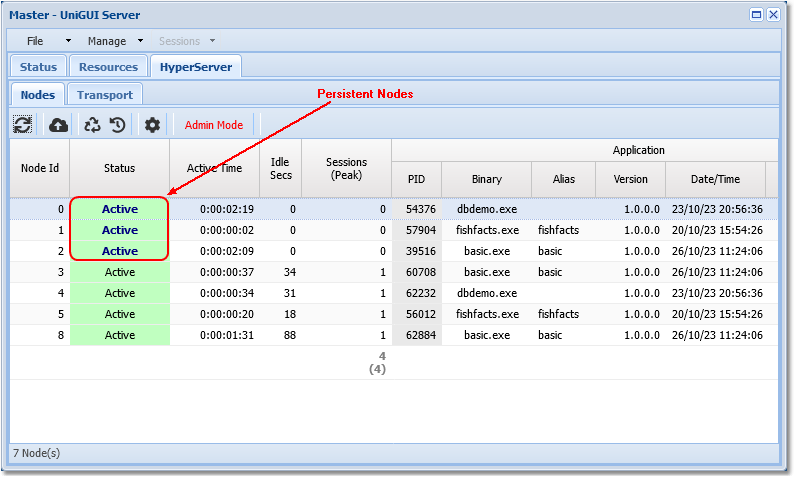
Starting from version 1.95 Persistent Nodes are shown in bold in the HyperServer monitor screen so you can distinguish them from other Nodes. In the image above there are three Persistent Nodes: one belongs to the HyperServer default application and the other two belong to additional applications configured for this HyperServer instance.
Persistent Node Zero (deprecated — see Persistent Node section above)
Persistent Node Zero is a Node with Id = zero (0) that was guaranteed to run continuously (never permanently unloaded) and would be reloaded immediately after being recycled. Its main purpose was to ensure a single Node ran background tasks (Singleton) when multiple process copies existed.
Example usage (execute only if current Node is Node Zero):
Or (to support deployment both with HyperServer and classical single-process mode):