
Understanding SSL Protocols
It is easy to become confused with the vast number of existing secure protocols for web communications. A common developer question is: which protocol must be used? The answer is simple: many SSL/TLS protocol versions existed over the years, but many are now obsolete because they were found to be buggy and insecure. As of today, TLS v1.2 is considered the widely accepted protocol that should be used and allowed as the minimum requirement for secure HTTP communication. Many major providers such as Google have already switched to TLS v1.3 for years.
Indy supports many protocols including SSL v2.0, SSL v2.3, SSL v3.0, TLS v1.0, TLS v1.1 and TLS v1.2. However, all of the pre-TLS v1.2 protocols are obsolete now and are rejected by modern browsers.
All modern browsers require TLS v1.2 as the minimum. Indy allows choosing multiple protocols at a time, but since anything except TLS v1.2 is obsolete, it is usually best to choose a single protocol. Using a single protocol simplifies the SSL handshake and avoids unnecessary exceptions during the initial handshake. The current Indy version included in uniGUI and the related DLL libraries does not support TLS v1.3, so TLS v1.2 remains the only valid protocol available. Unless you need to support very old legacy browsers, you are safe to use a single protocol: TLS v1.2.
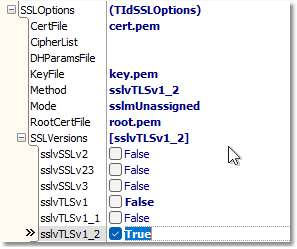
Regardless of uniGUI version and the default library settings in SSLOptions, it is recommended to set your SSL_Versions settings to use TLS v1.2 as shown below.
Related links:
Developer's Guide > Deployment > SSL Configuration: https://unigui.com/doc/online_help/ssl_configuration.htm
Previous topic: SSL – Error Logging: https://unigui.com/doc/online_help/ssl--error-logging.htm
Next topic: Using SSL under Linux: https://unigui.com/doc/online_help/using-ssl-under-linux.htm