Adjusting Folder Access Rights
A uniGUI web server requires access to several folders to read, write or create files during the server lifetime. Many such files will be created under the Cache folder which is used to store all uniGUI temporary files including session temporary files. Depending on the deployment method, the web server will be bound to different Windows user accounts.
Deployment types and corresponding accounts:
Standalone server
This account will be the current Windows user account.
Windows Service
This will be one of the LOCAL SYSTEM, LOCAL SERVICE or NETWORK SERVICE accounts. It can also be any other manually configured user account.
ISAPI module
This account will be one of the IUSR, IIS_IUSRS, IUSR_ or IWAM_ built-in accounts. The actual account name varies between different IIS versions.
Note: If you have used a different account for application pool authentication then you must give folder access to that specific account. Under normal circumstances if you have used LOCAL SYSTEM account then it must already have full access to your application folder so no additional adjustment may be needed.
For IIS 7.0 and later:
IUSR account is used when Anonymous Authentication method is enabled. Please see the ISAPI Module section for details: https://unigui.com/doc/online_help/isapi_module.htm
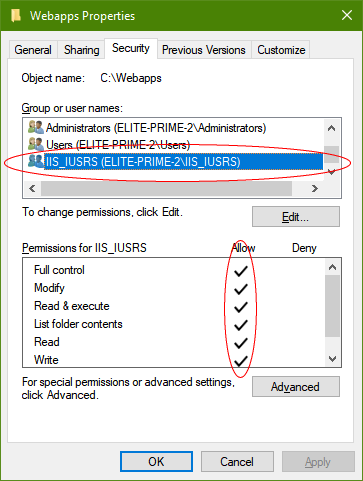
IIS_IUSRS is the group for all IIS users, so any change to folder access rights needs to be granted to both IUSR and IIS_IUSRS.
After determining the correct Windows account, grant the necessary permissions to the folders.
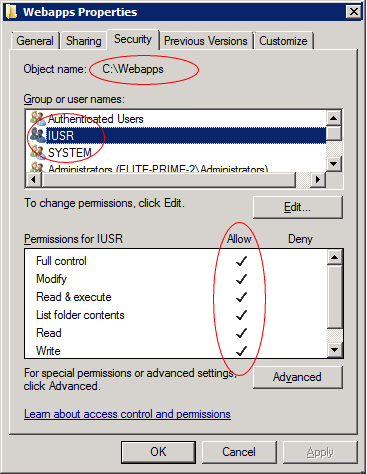
Full permission must be granted to the web application physical folder. Go to the Security tab and add the correct user account to the list of accounts. For example, if you are adjusting access rights for an ISAPI module then you must grant full access to the IUSR account for the web application physical folder and its sub-folders:
On IIS 7.0 and later it is also needed to add access rights for the user group IIS_IUSRS: