
Setting up the application
If your application is not part of a HyperServer cluster you need to make a few settings in the ServerModule.
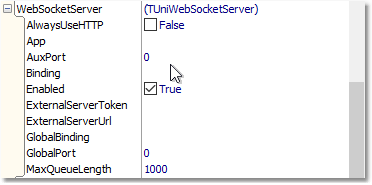
GlobalBinding
This will determine the global web host which will be used to access the dedicated WebSockets server. It should not be a URL. It is an IP address or domain name with an optional port number.
Valid entries can be such as below:
myglobalserver.com
myglobalserver.com:8077
187.1.1.32:8088
Above address will be used to construct a WebSocket URL such as ws://myglobalserver.com.
ExternalServerUrl
This URL will be used to internally access the dedicated server and relay messages to it. This relayed message will be broadcast to all sessions that belong to the same application.
It can be a global URL or a local network URL. It can be the same as GlobalBinding with the difference that ExternalServerUrl must be in URL format.
ExternalServerToken
In order to relay messages to an external server its token must be known. This will prevent unauthorized access to the server. Token can be found in the related CFG file of the HyperServer instance which is used as the dedicated WebSockets server. A random token is generated when HyperServer is started for the first time. Token can be changed by editing the CFG file.
App
This is an optional parameter which is used to identify the application. If this parameter is left blank then the module name (EXE or DLL file name) will be used as the application name.