uniGUI & WebSockets

uniGUI integrates WebSockets technology to enable developers to send messages directly to web clients from the server. uniGUI's WebSockets implementation is straightforward. Sending messages from server to clients can be done using the BroadcastMessage() method. When called, a message and related parameters are broadcast through uniGUI network using WebSocket channels. This broadcast will include all Nodes and slave servers in a server farm cluster. uniGUI automatically relays the messages to all server instances active in a server farm cluster. Each server sends the messages to its own web clients, ensuring that all sessions receive the messages regardless of cluster complexity.

For example, the following call sends a message named "update" to all existing clients:

Delphi
BroadcastMessage('update');

When this message is received by a web client, that client fires an Ajax request to the server. Consequently, on the server side an event handler named OnBroadcastMessage will be called:

Delphi
procedure TMainForm.UniFormBroadcastMessage(const Sender: TComponent;
  const Msg: string; const Params: TUniStrings);
begin
  if Msg = 'update' then
  begin
    UniLabel1.Caption := Query1.RecordCount.ToString;
  end;
end;

In the example above a UniLabel is updated each time a message is received to show the current record count of a database query.

Messages can be sent from nearly any place in the application (user events, other threads, timers). Messages may be sent asynchronously from any thread in the application. In a HyperServer cluster a message initiated from a Node will be propagated through all the servers in the cluster automatically.

When a message is sent using BroadcastMessage it is sent to web clients first. After the message is received by the client there are two ways to process it:

  • Process the message on the client side only (JavaScript event handler).

  • Process the message on the server side via the Ajax request fired by the client (recommended for most cases).

Below are examples for both approaches.

1

Updating the client directly using a JavaScript event handler

You can process messages on the client side only by writing a JavaScript event handler that alters Web UI elements based on message parameters. This requires basic knowledge of the Ext JS API.

BroadcastMessage can accept parameters as well:

Delphi
procedure BroadcastMessage(const Msg: string; const Args: arrayofconst; ClientOnly: Boolean = False);

Example sending a message with parameters:

Delphi
BroadcastMessage('update_grid',
  [
    'row', IntToStr(Random(GRD_ROW) + 1),
    'col', IntToStr(Random(GRD_COL) + 1),
    'value', Random(1000)
  ],
  [boClientOnly]);

The parameters are sent to the client as a JSON object, e.g.:

{ "row": "5", "col": "10", "value": 156 }

The boClientOnly option indicates that the client should process the message locally and no Ajax request is fired. If boClientOnly is omitted, the client will fire an Ajax request and the message will be processed on the server side.

Example client-side handler:

JavaScript
function form.socketmessage(sender, msg, params, eOpts)
{
  if (msg == 'update_grid') {
    var row, col;
    var grd = MainForm.UniStringGrid1;
    for (prop in params) {
      var p = params[prop];
      if (prop == 'row') {
        row = grd.store.getAt(p);         // row number
      } elseif (prop == 'col') {
        col = p;                          // col number
      } elseif (prop == 'value' && row && col) {
        row.set(col, p);
      }
    }
  }
}
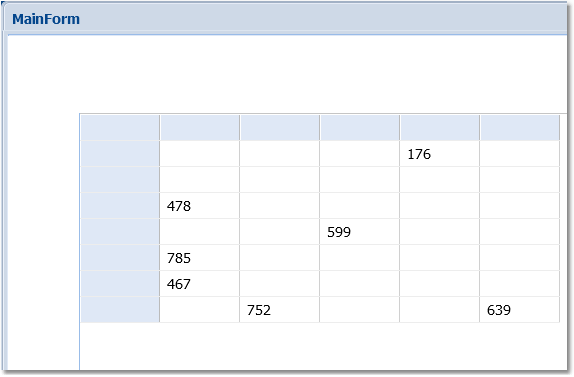
Above code updates a client-side grid:

clip0242

Demo folder: ..\Desktop\WebSocket - Client Update Grid

circle-info

Advantages of client-side direct updates:

  • Quickly update the client UI via WebSocket channel without using standard Ajax/HTTP channels (reduces load on HTTP channels). Disadvantages:

  • Requires writing JavaScript (client-side code) which is more limited compared to server-side updates.

  • All clients receive the same data; there's no built-in way to customize data per session.

2

Updating the client using server-side code

You can also update the client from server-side code — this approach often requires no JavaScript and is more straightforward for many applications.

When BroadcastMessage is called it sends the message through the WebSocket channel to all existing clients. Depending on the ClientOnly parameter the web client will or will not send an Ajax request back to the server. ClientOnly is false by default, so an Ajax request will be sent. The Ajax request informs the server that the client requests an update; necessary server-side code must be added to the handler to update the client UI.

Note: This method requires an Ajax request for each WebSocket message, which can incur a performance penalty if there are many updates in a short time. This can be mitigated by uniGUI scalability features such as using a server farm where load is balanced.

Example application uses:

Delphi
BroadcastMessage('message', ['text', UniEdit1.Text]);

Since boClientOnly is not included, a server-side event executes:

Delphi
procedure TMainForm.UniFormBroadcastMessage(const Sender: TComponent;
  const Msg: string; const Params: TUniStrings);
begin
  if Msg = 'message' then
  begin
    ShowMessage(Params['text'].AsString);
  end;
end;
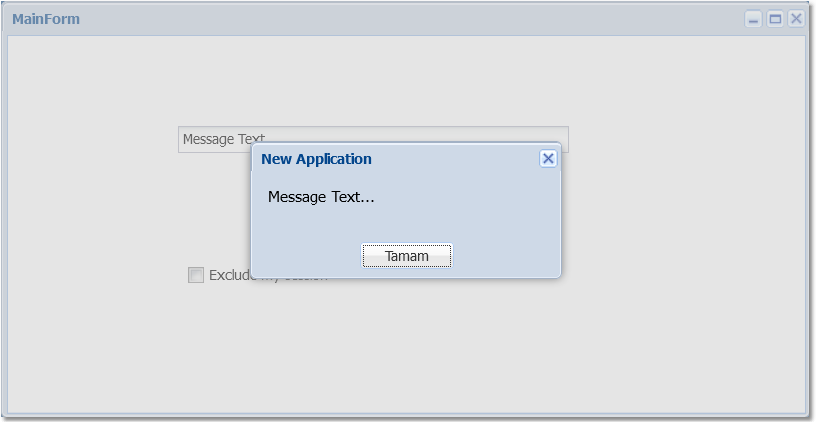
Above event handler shows the received message:

clip0252

As shown, processing the message on the server side is simpler to implement for many scenarios, but involves extra overhead since the message goes from the server to the client and then back to the server.

chevron-rightDemo folders referencedhashtag
  • ..\Desktop\WebSocket - Client Update Grid

  • ..\Desktop\WebSocket - Basic