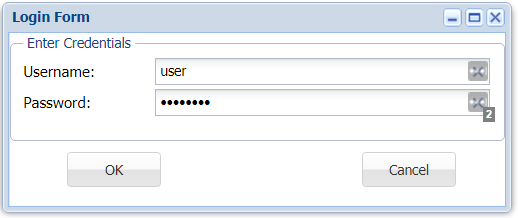
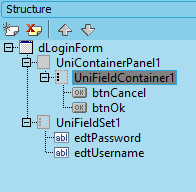
unit _dLoginForm;

interface

uses
  Windows, Messages, SysUtils, Variants, Classes, Graphics,
  Controls, Forms, uniGUITypes, uniGUIAbstractClasses,
  uniGUIClasses, uniGUIRegClasses, uniGUIForm, uniGUIBaseClasses, uniFieldSet,
  uniEdit, uniPanel, uniButton;

type
  TdLoginForm = class(TUniLoginForm)
    UniFieldSet1: TUniFieldSet;
    edtUsername: TUniEdit;
    edtPassword: TUniEdit;
    UniFieldContainer1: TUniFieldContainer;
    btnOk: TUniButton;
    btnCancel: TUniButton;
    UniContainerPanel1: TUniContainerPanel;
    procedure btnOkClick(Sender: TObject);
  private
    { Private declarations }
  public
    { Public declarations }
  end;

function dLoginForm: TdLoginForm;

implementation

{$R *.dfm}

uses
  uniGUIVars, MainModule, uniGUIApplication;

function dLoginForm: TdLoginForm;
begin
  Result := TdLoginForm(UniMainModule.GetFormInstance(TdLoginForm));
end;

procedure TdLoginForm.btnOkClick(Sender: TObject);
begin
  if uniMainModule.Login(edtUsername.Text, edtPassword.Text, true) then
    ModalResult := mrOk
  else
    ShowMessage('Invalid credentials!');
end;

initialization
  RegisterAppFormClass(TdLoginForm);

end.
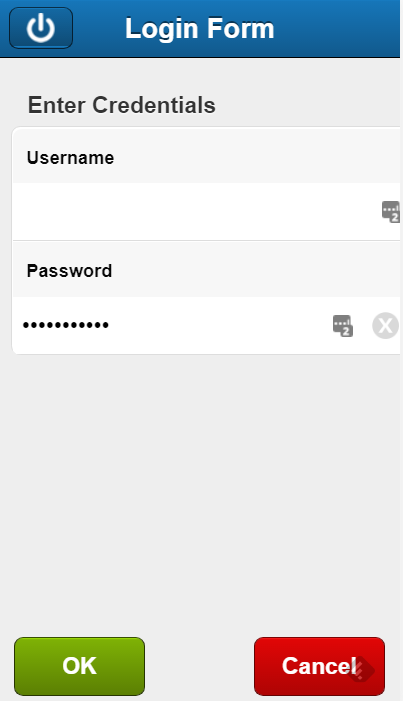
unit _mLoginForm;
interface
uses
Windows, Messages, SysUtils, Variants, Classes, Graphics,
Controls, Forms, uniGUITypes, uniGUIAbstractClasses,
uniGUIClasses, uniGUImClasses, uniGUIRegClasses, uniGUIForm, uniGUImForm,
uniGUImJSForm, uniGUIBaseClasses, unimFieldSet, uniEdit, unimEdit,
uniButton, unimButton;
type
TmLoginForm = class(TUnimLoginForm)
UnimFieldSet1: TUnimFieldSet;
UnimContainerPanel1: TUnimContainerPanel;
edtUsername: TUnimEdit;
edtPassword: TUnimEdit;
btnOK: TUnimButton;
btnCancel: TUnimButton;
procedure btnOKClick(Sender: TObject);
private
{ Private declarations }
public
{ Public declarations }
end;
function mLoginForm: TmLoginForm;
implementation
{$R *.dfm}
uses
uniGUIVars, MainModule, uniGUIApplication;
function mLoginForm: TmLoginForm;
begin
Result := TmLoginForm(UniMainModule.GetFormInstance(TmLoginForm));
end;
procedure TmLoginForm.btnOKClick(Sender: TObject);
begin
if uniMainModule.Login(edtUsername.Text, edtPassword.Text, false) then
ModalResult := mrOk
else
ShowMessage('Invalid credentials!');
end;
initialization
RegisterAppFormClass(TmLoginForm);
end.