Populating the UserString

clip0217

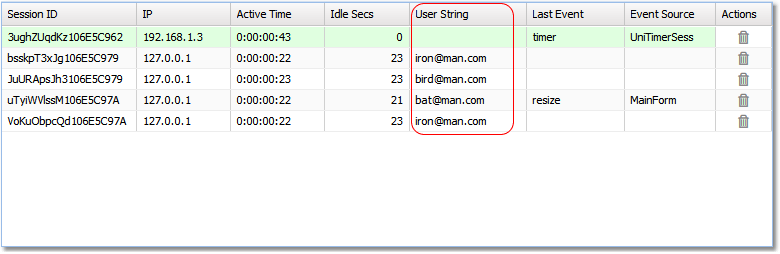
In the sessions grid there is a column named "User String". The TUniGUISession class exposes a special property named UserString which can be populated by developers. Whatever value is assigned to this property will be displayed in the sessions grid. This provides an easy way to identify the owner of the session — for example an email address, a user name, an IP address, or any other convenient identifier.

The best location to populate the UserString property is when your MainForm is created. Example:

MainForm.pas
procedure TMainForm.UniFormCreate(Sender: TObject);
begin
  case Random(4) of
    0: UniSession.UserString := '[email protected]';
    1: UniSession.UserString := '[email protected]';
    2: UniSession.UserString := '[email protected]';
    3: UniSession.UserString := '[email protected]';
  end;
end;