
Reporting Tools
There are some special guidelines for reporting tools to make sure they run in a compatible mode with uniGUI. Some reporting tools have special settings for multi-threaded applications. In many cases you need to disable visual dialogs and other VCL related forms from being displayed while the report engine is running. Since in uniGUI you cannot display VCL forms, you will need to export the report to a file. A commonly used format is PDF which can be embedded in a browser window or an iframe.
In uniGUI, the recommended method to create a report is converting it to a PDF file and displaying it inside a TUniUrlFrame control. For each reporting tool there are different paths to achieve this. Under this topic we will shortly cover a few reporting tools. You can also load and run the related demos to see how it is actually done.
Important: As described in previous sections, there are some common issues in reporting tools that may affect the uniGUI application stability and scalability. Initial versions of reporting tools were created for desktop applications only. Over time they evolved and started to support server applications too; however, they may still contain components or code parts which are not compatible with multi-threaded server applications. Some reporting tools generate the report by using VCL controls which render it to a canvas before exporting it to a PDF file.
Be aware that some reporting tools render their reports by using the TRichEdit control with all the issues described elsewhere. This kind of reporting tool cannot be used inside the uniGUI application, but it could be used by some external web service. A "printing server" web service could spawn external processes for exporting PDF reports, but this solution requires some central database where the information required for the report is stored (in such a way that the uniGUI application could ask for some specific report and receive the PDF file as the result).
To fully test the compatibility of a reporting tool with your application, you should run a Stress Test and fully analyze your application behavior: https://unigui.com/doc/online_help/stress-test-tool.htm. It is important to make sure that both your particular reporting tool and your particular report design can scale up when the server is under load.
Another important point is to make sure creation of report components and generation of report happen in the same event. Some report components internally use VCL controls which need to create Window handles. Those handles must be created and released in the same thread, so it is necessary to create and destroy report components in a single event call. The best way to achieve this is to place report components on a Free DataModule. The free data module will be created when the report needs to be generated. After the report is created the data module should be freed.
Below code is taken from our FastReport demo:
procedure TUniForm1.UniFormBeforeShow(Sender: TObject);
var
  dm : TfrDM;
  RepUrl : string;
begin
  dm := TfrDM.Create(nil);
  try
    RepUrl := dm.GenReportPDF(InvNum);
  finally
    dm.Free;
  end;
  UniURLFrame1.URL := RepUrl; // display generated PDF inside a frame
end;
In the above code the data module is created on demand, the report link is generated and the data module is destroyed after.
Below is the actual free data module which is used to generate the report:
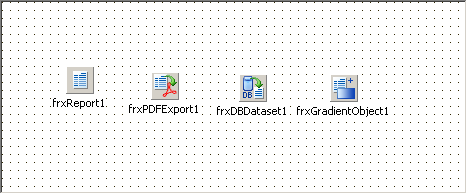
A Free DataModule for report generation
Further reading and related topics:
Free DataModule: https://unigui.com/doc/online_help/free-datamodule.htm
Stress Test Tool: https://unigui.com/doc/online_help/stress-test-tool.htm