Thread Stack Size

Each Windows thread receives a private stack whose size equals the default stack size of its host process. In Standalone or Windows Service mode, the stack size is determined by Delphi. By default, the stack size of a Delphi application is 1 MB. It can be changed via Project -> Options -> Linking -> Minimum Stack Size / Maximum Stack Size parameters.

They can also be adjusted by compiler directives:

{$M minstacksize,maxstacksize}

{$MINSTACKSIZE number}

{$MAXSTACKSIZE number}

These settings only apply to executable binaries. ISAPI DLLs use the host process default stack size value for internal threads. That can be a problem for a uniGUI application which is designed to work with a different stack size than the stack size of the DLL host process. In IIS 7.0 and later, the default stack size is 256 KB for 32-bit applications and 512 KB for 64-bit applications. These values are lower than the Delphi default of 1 MB. As a result, a web application that runs correctly in standalone mode can produce unexpected Stack Overflow exceptions when deployed in ISAPI format.

The default 1 MB stack size for Delphi applications is actually a large value for typical applications. A Delphi application should not rely on stack size to work properly. The stack is a temporary storage area used for local variables inside functions and procedures. It is wise to keep local variable usage to a minimum when designing an application. For instance, the following snippet uses a local array allocated on the stack:

procedure TMyClass.DoCalculate;
var
  MyCalcArray: array[1..10240] of Integer;
  I: Integer;
begin
  for I := 1 to 10240 do
    MyCalcArray[I] := I * 10;
end;

This local array consumes stack memory and should be avoided; developers should use dynamic data structures which are created on the heap:

var
  MyCalcArray: array of Integer;
  I: Integer;
begin
  SetLength(MyCalcArray, 10240);
  for I := 1 to Length(MyCalcArray) do
    MyCalcArray[I] := I * 10;
end;

If your application crashes with a Stack Overflow message it is a sign of either a recursive call (a bug) or that your application's stack usage exceeds the default stack setting. In that case, you must either reduce stack usage by changing your code/logic or increase the application default stack size.

Note that Stack Overflow is a serious condition with no recovery option. In some cases, the Stack Overflow condition will log an error in the uniGUI log file with an exception message on screen. In an ISAPI application a Stack Overflow error may terminate your ISAPI pool silently without any on-screen exception message or uniGUI log entry. However, you can see an event in Windows Event Viewer indicating that your application pool terminated and restarted due to an unexpected error.

Changing ISAPI Application Default Stack Size
circle-exclamation

Below lines only apply to uniGUI build 1607 or older.

In any case, you may still want to change the stack size of your DLL application which is imposed by the IIS worker process. uniGUI provides a simple way to achieve this.

1

Step

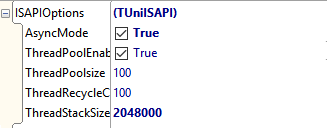
In ServerModule, expand ISAPIOptions and set AsyncMode to True.

2

Step

Set ThreadStackSize to the desired value. In the example below the stack size is set to 2 MB.

clip0103

Please note that these settings only apply to ISAPI DLL modules. For Standalone and Service Applications the stack size should be adjusted using the conventional methods described above.